Free Minecraft Auto Clicker.
Jitter clicking, butterfly clicking and a built-in CPS test — tuned for Hypixel BedWars, KitPvP and Skywars. Humanized click timing, hold or toggle hotkeys, and click profiles you can save. Lightweight, open-source, and completely free.
CPS test
How fast can you click?
Try it right here — pick a duration, then click the pad as fast as you can. See your live clicks-per-second, your peak, and where you land on the PVP scale.
Duration
Click engine
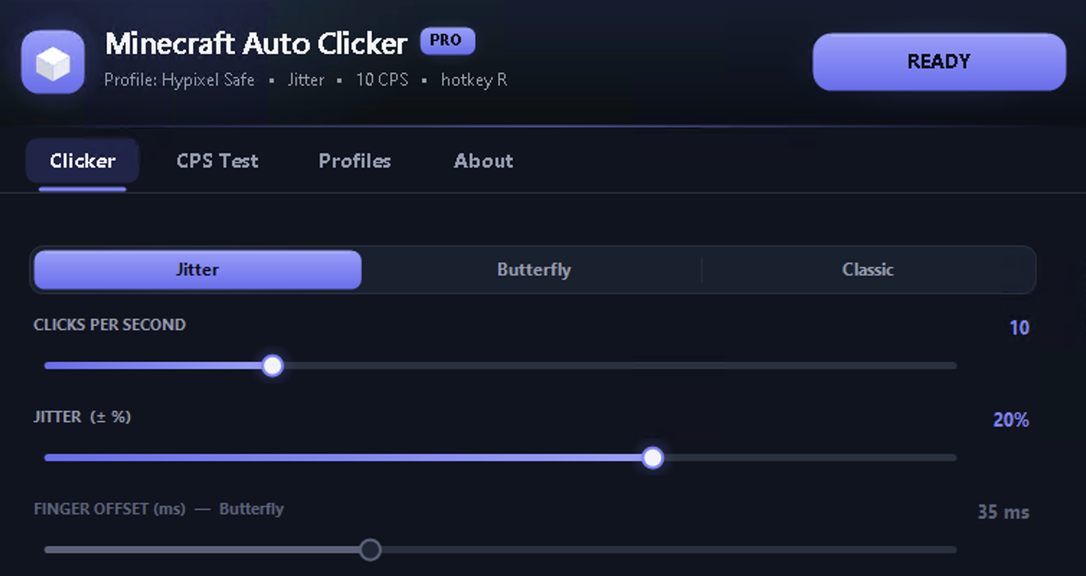
Three clicking modes, one clean engine
Every mode uses high-resolution timing and humanized jitter so your clicks never fire on a robotic fixed interval.
Jitter clicking
One rapid, humanized click stream. Set a base CPS and a jitter range — timing varies on a Gaussian curve, never a flat interval.
Butterfly clicking
Two independent finger streams alternate for a higher, steadier CPS, with a collision guard so the two never overlap.
Classic burst
A steady fixed-rate click with a tight ±5% variance — perfect for menus, farming and simple hold-to-click tasks.
Features
Everything a PVP clicker needs
Humanized timing
Gaussian jitter and high-resolution timers keep every click stream natural, not machine-perfect.
Hold or toggle
Bind a hotkey to click only while held, or toggle on and off. Your call, per profile.
Built-in CPS test
Measure your real click speed with live CPS, peak tracking and a 10-second graph.
Click profiles
Save named presets — Hypixel Safe, BedWars Bridge, Butterfly PVP — and switch instantly.
Left / right / middle
Target any mouse button, so it works for attacking, bridging or using items.
Safety cap
Set a max CPS ceiling so a slipped setting never fires an absurd, obviously-bot rate.
No injection
Sends real input events. Nothing is injected into java.exe — no DLLs, no kernel drivers.
Quick setup
Download, run the installer, and you're clicking in under a minute — no account, no paywall.
Open source
MIT-licensed on GitHub. Read the code, build it yourself, scan it on VirusTotal.
Get started
Clicking in under a minute
Download & run
Grab it from GitHub, run the installer, and launch the app — no account, no drivers needed.
Pick a mode
Choose Jitter, Butterfly or Classic, set your CPS range and bind a hotkey.
Hold & play
Jump into practice or a server that allows it, hold your hotkey, and click.
Play fair & know the rules
Auto clicking is great for practice, single-player and servers that allow it — but many competitive servers (including Hypixel) restrict automated clicking. This tool does not bypass any anti-cheat and does not inject into the game; it simply sends input. Use it responsibly and follow the rules of the servers you play on. Not affiliated with Mojang or Microsoft.
FAQ
Questions, answered
Is this Minecraft auto clicker free?+
Will it get me banned on Hypixel?+
Jitter vs butterfly clicking — what's the difference?+
Is it safe? Any viruses?+
Which Windows versions are supported?+
Does it work outside Minecraft?+
Download Minecraft Auto Clicker
Free, open-source, and ready in seconds. One click, quick install, no strings attached.